Selling your gadget on Amazon
Quite soon, I²CDriver and SPIDriver will go on sale on Amazon. The product pages are here:
I2CDriver
SPIDriver
There are some guides online about how to get started selling stuff on Amazon. Here are my notes. As a first step, you need access to a laser printer and a DSLR. You need a printer to make labels for your goods. And you need a DSLR to take decent photos of the goods. Photos taken with a phone camera will not do.
Amazon is quite transparent about their pricing. You can use their online calculator to decide about your selling price. One thing to be aware of is that the "Ship to Amazon" cost is probably a lot cheaper than you think. More on that below.
After you have registered as a seller with Amazon, you can use their amazingly awkward web interface to add your product for sale. Assuming you're selling something completely new, it will ask you for its product UPC. My products don't have UPC codes, but that's no problem because places like SnapUPC.com will sell you a single UPC for a couple of bucks. It arrives in your email in a few seconds, and you can start filling in the Amazon form.
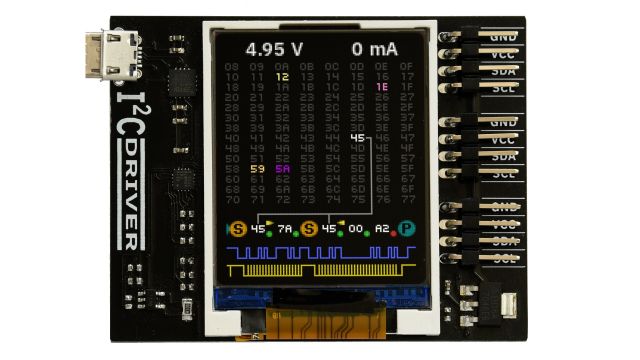
It will ask for photos. The main photo needs to be a on a plain white background. This is easily done by putting the product on a sheet of white paper. I won't go into the details of the photography here, but the great thing about photographing goods is that the subject matter doesn't move. This means you can use a really long exposure time, which makes a tiny amount of light look like a huge amount of light. For example, this is I²CDriver sitting on a piece of white paper lit by regular room lights. Exposure time was about 2 seconds at f/16:
After you've uploaded the photos and you're waiting for it to approve them, you can start composing your five bullet points. Amazon marketplace products do have a descriptive paragraph, but if you look at any listing, the description is way down the page. So most of your energy should be spent on the five allowed bullet points that everyone will read first.
After you have created the product listing, the page will appear on Amazon, and you can iterate on it until it looks the way you want it. But first you should ship the goods to Amazon, because the fulfillment pipeline is many days long, so you should get started.
First you put labels on the product. These are the unique labels that Amazon uses to identify your particular thing in the vastness of the fulfillment center. They let you download a PDF with a whole sheet of labels, for printing with label sheets like this one. That's why you need a printer.
When preparing the shipment, if you send Amazon too few items (about 20 seems to be the threshold) it will request that you send multiple shipments to different fulfillment centers. Above about 20, they arrange the internal distribution themselves, and you only have to send one package. I didn't figure this out at first, and having to prepare and ship multiple packages is quite annoying.
The second thing I didn't figure out is that they let you buy the shipping (e.g. UPS Ground) at really good rates. The price for shipping this week's batch of I²CDrivers and SPIDrivers was about 14 cents each.
Last tip: you can use a crappy box. The only people who will see the box are the unpackers at the fulfillment center, or maybe only their robots. Reusing an old Amazon box has a feeling of justice to it.
That's it. Amazon starts selling your product and depositing the proceeds in your bank account.